Enter and Exit Multi-Strike Option Positions in One Click
Three ways into a position, three ways out, and the hotkeys that close the whole book without touching the mouse.
Scalping index options is a speed problem before it is a strategy problem. If closing six strikes means six trips through an order ticket, the fill you planned for is already gone. Imperium Trader puts entry and exit on the same screen as the option chain, and closes the whole book with one keystroke.
There are three ways into a position and three ways out. This article covers each one, and when to reach for it.
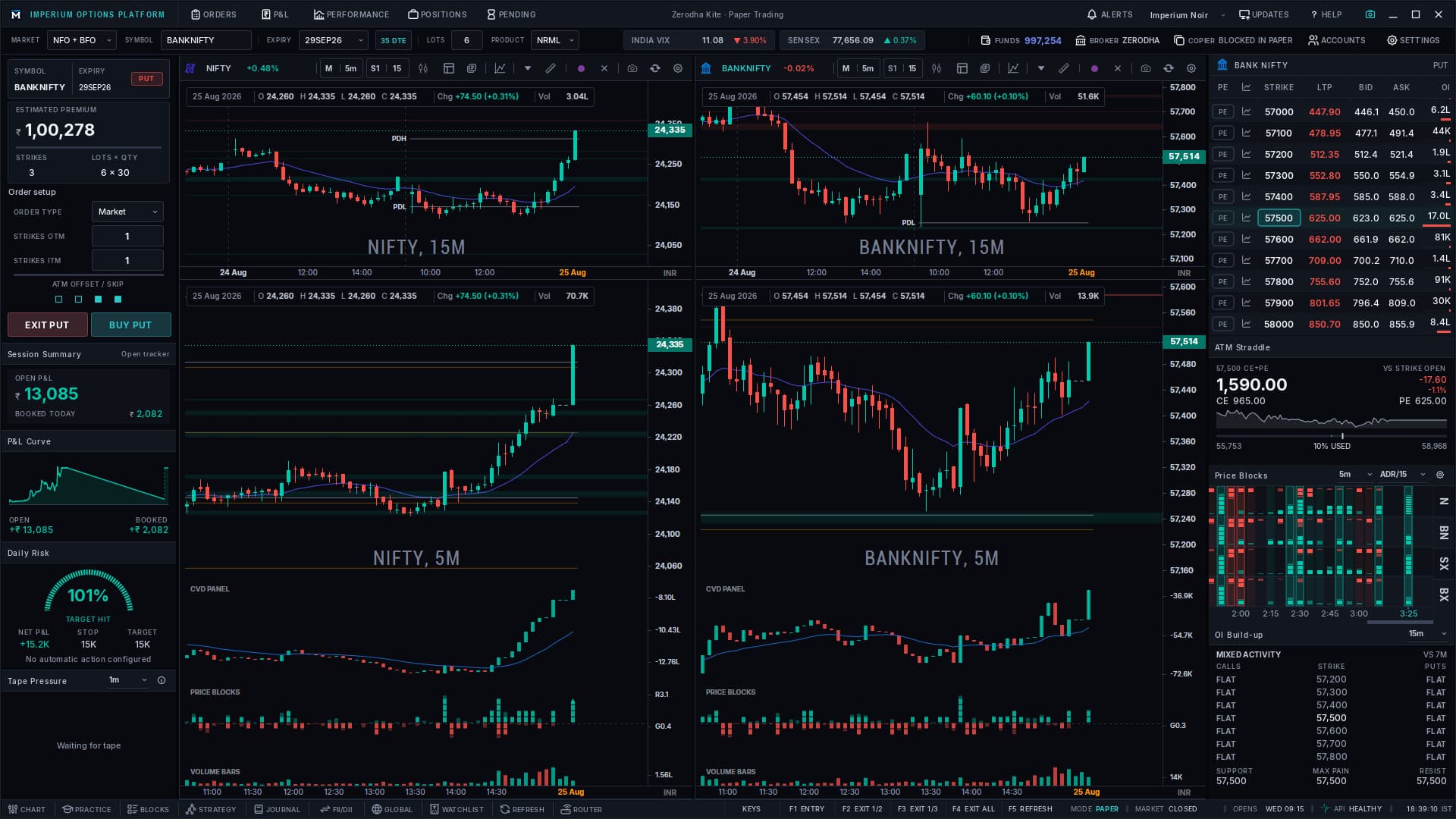
Entering from the option chain
The option chain sits on the right of the workspace. Every strike carries its own controls, so you place an order from the row you are already reading.
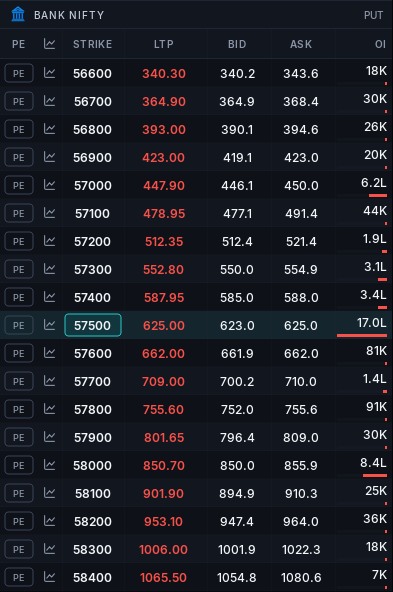
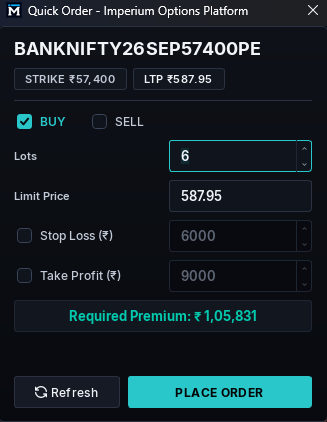
Selecting a strike opens the Quick Order dialog. It carries the contract, the strike, the current LTP, a buy or sell choice, lot count, and a limit price prefilled at the last traded price. Optional stop loss and take profit values can be attached to the order before it goes out. The required premium updates as you change lots, and the refresh control snaps the limit price back to the current LTP when the market has moved while you were deciding.
Two details make this faster than it sounds. The chain toggles between call and put on a double-click or the T hotkey. And the chain follows your active chart: interact with the Bank Nifty chart and the chain is Bank Nifty, switch to Sensex and the chain switches with it. You never select a symbol twice.
Entering from the strike selection panel
The panel on the left builds a multi-strike order as a rule rather than a list. Set how many strikes in the money and how many out of the money you want, and the panel selects them around the current at-the-money strike.
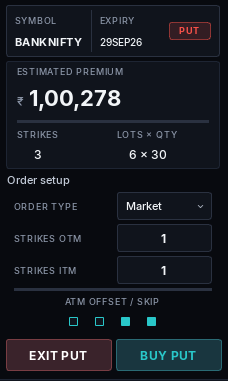
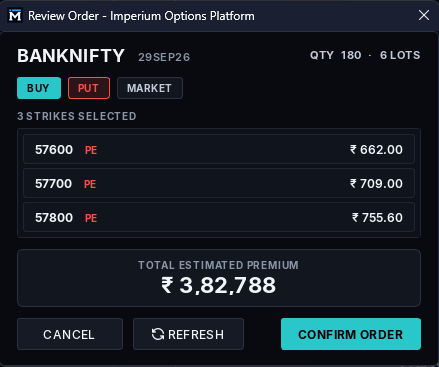
One in the money and one out of the money gives you three strikes — the at-the-money strike is always included. The panel totals the premium required before you commit, and that total updates as you change expiry or lot size. Set six lots and the estimate reflects six lots on every selected strike.
Buy and exit are separate controls for each side, and a double-click toggles the panel between call and put. Order type is limit or market.
Committing opens a Review Order dialog that lists every selected strike with its own premium, the total quantity in lots, and the combined estimated premium. Nothing is sent until you confirm.
Offset and skip: selecting strikes that are not adjacent
Consecutive strikes are the default, not the limit. Two controls change which strikes the rule picks.
Offset moves the anchor
Offset shifts which strike the panel treats as at-the-money. Move the offset up one and the selection re-centres a strike higher, taking the in-the-money and out-of-the-money counts with it. Use it when you want the structure built around a level the market has not reached yet.
Skip spreads the selection
Skip leaves the anchor alone and puts gaps between the strikes it selects. With skip set to one and one strike either side, you get the at-the-money strike, then the next strike out is skipped and the one after it is taken — on both sides. Set skip to two and two strikes are passed over between each selection.
Offset and skip combine. Leave both off for a continuous ladder around at-the-money.
Three ways out
Exits matter more than entries when a trade goes against you, so there is a route for each level of urgency.
- One position. Right-click it in the positions table and exit.
- Part of the book. F2 exits half your lots, F3 exits a third. Each needs the position size to divide cleanly — F2 on an odd number of lots, or F3 on a count that is not a multiple of three, has nothing clean to close.
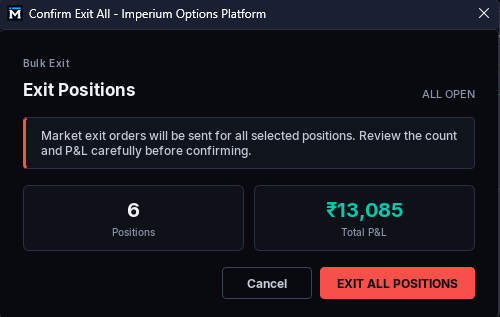
- Everything. F4 or X closes every open position.
Bulk exits open a confirmation showing the position count and the combined profit and loss before anything is sent. Exits go out as market orders, which is the point — a bulk exit is for getting flat, not for getting a price.
What you get after the trade
Order history breaks each closed trade into entry time, exit time, symbol, quantity, entry price, exit price and charges. Charges are modelled on the standard brokerage, exchange and statutory components, so the net figure is closer to what your broker will settle at than a gross number that flatters the result. Treat it as an estimate; your contract note is the record.
The session summary tracks the path rather than the outcome. Open and booked profit and loss sit alongside a running P&L curve — where the position was entered, where it peaked, where it went against you. That is the difference between knowing a trade made money and knowing whether you held it well.
Entering from the strategy builder
The strategy builder is the third entry route. Build the legs, review them, and execute the strategy as a single order. It is entry only — close a strategy from the positions table or with F4.
Hotkey reference
| Key | Action | Notes |
|---|---|---|
| F1 | Enter the current strike selection | — |
| F2 | Exit half your lots | Needs an even lot count |
| F3 | Exit a third of your lots | Needs a multiple of three |
| F4 · X | Exit all open positions | Sent as market orders |
| F5 | Refresh limit price to LTP | — |
| T | Toggle between call and put | Chain and panel together |
